Detailed SoundPLAN information for Version 7.1

See in this webpage what is new and noteworthy in the SoundPLAN version 7.1. Iit shows you why SoundPLAN leads the way in noise and air pollution evaluation and mapping.

News about SoundPLAN 7.1

bullet Free of charge for warranty customers and those with on-going software maintenance
bullet Direct link to Google Earth©
bullet Data entry for circular objects
bullet 3D solid model in the Geo-Database
bullet Transparency for objects
bullet Improvements to the Attribute Explorer
bullet Triangulated elevations make ground elevations for objects obsolete
bullet Calculations directly from the Geo-Database
bullet Improvements to the mean propagation list
bullet New borrow function of networked licenses
bullet Map descriptions with place holders

For visitors who have not experienced SoundPLAN software, here are some highlights showing why it is the most used software of its kind.

bullet SoundPLAN is a truly modular program system - purchase only what you need and not more!
bullet Projects can range from small to huge because of the unique structure of Geo-Files and Situations. SoundPLAN is a multi document application - work on multiple input files at the same time.
bullet Tiling of large areas permits unlimited project space to be processed.
bullet High performance calculation core set up for batch processing, background computing, and distributed computing, and works with multi core CPUs.
bullet All results are traceable and repeatable as all parameters for a calculation are saved.
bullet Point, line and area sources with entry as sound power level or pressure level (with sphere or box model transformation to sound power). Calculate with mean frequency or octave bands or third octave bands.
bullet Fully integrated program suite with road, railway, industrial, industrial indoors and aircraft noise Plus, air pollution models designed in the same manner..
bullet Industrial buildings act as the connection between indoor modeling and environmental noise models.
bullet Wall Optimization
bullet High end graphics supporting multiple maps in a drawing sheet. Each noise map can consist of multiple, independently calculated maps seamlessly joined together.
bullet Joint display of bitmaps and noise maps in 3D.
bullet Spreadsheet for complex evaluation of results and areas.
bullet Libraries for noise sources, noise transmission, reflections, time history, directivity, noise assessment.
bullet All options and controls in the program are menu driven -  there are no cryptic macro languages.


Free for maintained licenses

Customers with a maintained license will receive SoundPLAN 7.1 free of charge on a DVD. The program needs to be installed on the computer. Older versions of SoundPLAN can remain on the same PC; they do not have to be uninstalled in order to install SP71. To update the version, access the web through the "Help" menu of the SoundPLAN manager (seen to the right).

The demo version is restricted so it can't be used commercially. Files created with the demo version cannot be saved. You can enter data in the Geo-Database and experience the handling, but the data are not saved.

The installation currently available on the server is still in the beta phase. Some minor components such as the HASP copy protection are in the last phase of testing. To download the version, click here: DOWNLOAD SP71.

Back to list

Direct link to Google Earth

The Geo-Database of SoundPLAN 7.1 has a direct link to Google Earth. If Google Earth is installed on your computer, you can directly access Google Earth and download the aerial view of your study area. As long as you are using established coordinate systems, the interface allows you to establish the view port on Google Earth and load the correct bitmap. Coordinate transformations are available between many different coordinate systems. Other objects can be digitized on screen on top of the Google Earth bitmaps.

Grid Noise Maps, Facade Noise Maps and other maps can be sandwiched with the bitmaps to enhance the recognition of the planning environment.

Back to list

Circular objects

Round-abouts on roads, tanks, and other circular object sometimes demand that you can directly enter circles. SoundPLAN 7.1 allows two modes of circle entry; enter it via two opposite points on the circle or via the center and the radius. The parameters of the circles are available for editing as can be seen in the picture to the right where the center and the radius is entered.

Back to list

3D solid model in the Geo-Database

Use Ctrl F10 to see the solid model like that seen to the right. Not only can you navigate in the 3D picture for view purposes, but you can also open an object for editing. This is particularly helpful if you have nested objects in the top view that are fairly complicated to edit.

Back to list

Transparency for Objects

Complex shapes that are nested or contain other objects within, are sometimes difficult to visualize as solid models. SoundPlan's new 3D solid model allows objects to be transparent so they are visible but do not obscure the view to the objects inside. The factory hall to the right is an example of this. The walls are displayed in turquoise and the sources inside are purple. On the outside of the walls, the position of the windows, which, with their different transmission loss, must be accounted for correctly, are clearly visible.

Back to list

Improvements to the Attribute Explorer

The Attribute Explorer allows the user to view all parameters of an object as a table. In version 7.1 this tool is now available for roads and railways that have non-constant parameters such as speed, road surface, geometry and traffic parameters. Aside from controlling the data, it is also possible to perform calculations. For example, it is possible to have different prognosis factors for traffic volume depending on the road type.

Back to list

Triangulated elevations make ground elevations for objects obsolete

SoundPLAN makes the triangulated Digital Ground Model (DGM) the central focus for the elevation supply of the noise model. With imported data such as those seen to the right, clouds of elevation points get imported, filtered and triangulated. The filter can reduce the size of the DGM by up to 95%, depending on the accuracy setting the user chooses. The triangulated surface becomes the canvas upon which the objects are painted. To accurately set the elevation of roads and buildings and extract the height of the building, it is also possible to import the elevation data only where the roads are located. This import will greatly enhance accuracy of the model.

As SoundPLAN uses the 3D triangulation of the model data for setting the objects elevation and also for the calculation, the ground elevation of the objects themselves becomes obsolete. In the final version of SP7.1, coordinates will be strictly x,y,z. The relationship of the object with the ground will come entirely from the DGM. The picture to the right shows elevation data to be imported. As the buildings tops are part of the elevations, the building heights can be set from this DGM.

Back to list

Calculations directly from the Geo-Database

SoundPLAN calculations keep track of all calculations, settings, parameters, input files and results. These calculations are also capable of running in the background while you edit other data. Power users are praising this feature of SoundPLAN while novices question why they need to save the model data in the Geo-Database before starting a calculation. To help both types of users, the Geo-Database now has a direct link to the calculation. This direct link is to do a simple calculation how high a noise level is at a given location, or to generate a triangulation that will become part of the situation, or to check if all input data required in the calculation are, in fact, present. If information is missing (for example, you imported a source but forgot to assign a sound power), the program will open the object in question so you can fix the problem.

Back to list


Improvements to the mean propagation list

Noise maps are now the standard for evaluating noisy environments. However, when it comes to legal situations, many countries have the law set up to shield noise sensitive receivers. For these receivers, tabular output is available in SoundPLAN. Amongst them is the receiver table, the detailed source by source evaluation, time history, spectral information, and last but not least, the mean propagation table. Here, the average screening, spreading, ground effect, etc., are listed for each source.

Back to list

New borrow function of networked licenses

SoundPLAN is available as a stand alone program or as a networked application. Now the network license can reside in one place but still be used elsewhere. For example, a user may need to work a day at home. Or he may need to take the notebook on the road and travel with it to the client. With SoundPlan's innovative new borrow function, an engineer can borrow a license from the license server for up to a week and work off line with SoundPLAN.

Back to list


Map description with place holders

Keep your graphic maps up-to-date using place holders:

  • Change the time slice of your map and it is automatically changed in the colored scale, too.
  • Store the project path and sheet name on the map.
  • Enter a name for a formula, e.g. for the difference map, and the description in the map is automatically updated.

Back to list

Highlights of SoundPLAN


Modular Program

By design, SoundPLAN is modular. This has two mayor advantages. First, you can choose which modules you need for your work. If you never have to deal with aircraft noise, why increase the cost of your license with this module? Buy what you need, and when the requirements for your projects increase, then purchase additional modules. As long as the license is maintained, there is no extra overhead cost involved in upgrading. You get a new license file and be on your way in less than a day.

The second advantage is that the program is designed to run in individual sections. You can always run a calculation while you prepare the next scenario. Calculate in the background or work with multiple screens to view different aspects of the project. View graphics and tables at the same time.

Further information about the modules from the SoundPLAN website

Additional information about modules

Back to list

Situations and Geo-Files

SoundPLAN projects are organized with Situations and Geo-Files. The Situations function like a directory, gathering all data to describe a scenario. There is no limit to the number of Situations that can be created within a project. The data themselves is stored in the Geo-Files. Drag and drop Geo-Files to assemble new Situations. It is also possible to copy Geo-Files. For example, you can have two versions of the road system, one for current traffic and one for the projection in 10 years.

Information about the GeoDatabase

Back to list

Tiling large projects

Some projects are big, some are huge, and some are so huge the amount of data is measured in gigabytes rather than in megabytes. For these huge projects, it is sensible to organize data in regions. SoundPLAN's tiling system allows users to partition projects in tiles. The city of Backnang (where SoundPLAN is developed) is shown to the right. It was organized with a tile size of 2000x2000 meters. Other common sizes are by square kilometer.

Only the data within a tile are loaded in memory. However, the tile navigator allows the user to save one tile and re-load the neighboring tile with one mouse click. For the calculation, it is also possible to perform calculations of much bigger areas than otherwise would fit into memory.

Back to list

High performance Calculation Core

All SoundPLAN calculations are started from a spreadsheet. This spreadsheet keeps track of all settings, parameters, files and results (see the run info to the right). Each of the results has a record of the parameters so it "knows" how it was generated. If the model data change, it is very easy to re-run the data by starting the calculation run. This also guarantees you can prove how the results were generated.

If your project is so large a single multi threaded PC is not enough, click on this symbol to start calculating extensive noise maps on multiple PCs. This process is called Distributed Computing. To learn more about Distributed Computing, click here: DC

Back to list

Traceable results in Documentation, Spreadsheet and Graphics

Each of the result files carries a full run description where details of the parameters can be viewed along with all geometry that went into the calculation.

Learn more about the SoundPLAN graphics

Back to list

Industrial sources

Industrial sources are of the types point, line, area and industrial buildings. Each source can be associated with a time history to define how the source emits over the 24 ours of the day. Directivities (2D, 2D rotational symmetry and 3D) define the directional differences in the emission. As SoundPLAN uses the sound power in the calculations, convert sound pressure values into sound power. To do this, SoundPLAN's conversion tool to the right is useful.

Learn more about the industrial noise in SoundPLAN

Back to list

Integrated system with road / rail / industry / indoor factory /aircraft noise

Road, railway and industrial noise calculations are completely integrated and can be calculated in a single calculation run. Simulations within a factory building are integrated but require their own calculation run, just like the calculations for the transmission of noise from the inside of a building to the outside.

Aircraft noise follows a slightly different path by defining the flight path as a matter of straight flights with a heading of x degrees and circles, with a user defined radius rather than through a list of coordinates. Climb and decent profiles are also available.

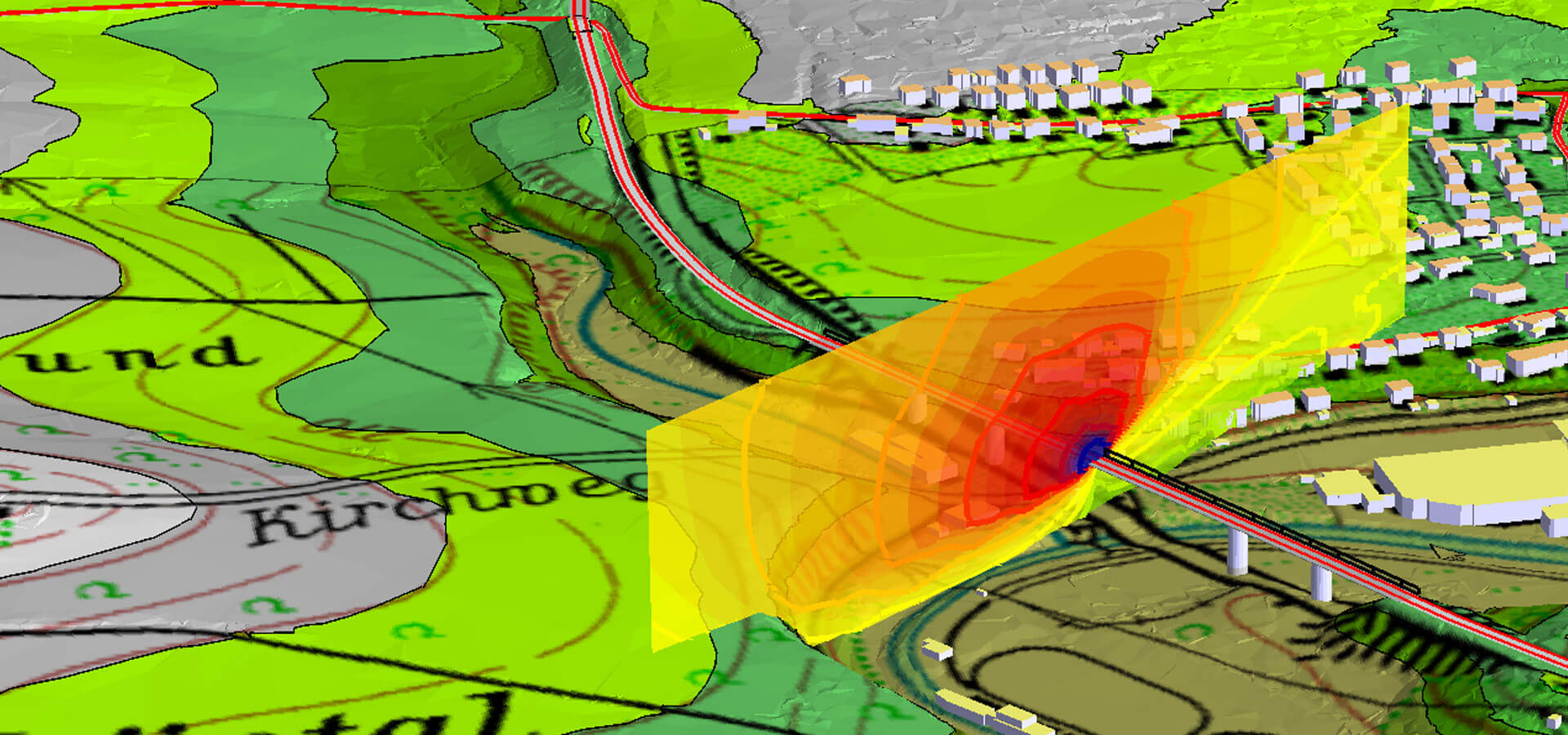
Graphics can be produced for all types of noise in many different forms and formats (Grid Noise Maps, Triangulated Meshed Maps, Facade Noise Maps, Cross-sectional Noise Maps...).

Learn more about aircraft noise

Back to list

Industrial Buildings with calculations inside and transmission

When the building has been defined and the average absorption of all scattering objects has been entered, it is time to place noise sources inside the building and define the outer shell. You can design windows and doors on the facades and can even nest open windows within the band of windows.

To the right, you see that for a window on the facade of a car-wash, the noise emitted for the area is being calculated as Lw=Li-6-R   with Li the noise level inside and R the transmission loss of the window itself. In the calculation, SoundPLAN will triangulate the facade and the window and assign the correct emission value to each of the triangles.

Back to list

Wall Design wall optimization module

The purpose of this component of SoundPLAN is to optimize the shape of noise barriers along roads and railways so that residential dwellings are properly shielded for minimum cost. Wall Design is a module unique to SoundPLAN. No other software has any noise protection planning tool that comes even close to the capabilities of Wall Design.  


Wall Design assumes that a noise protection wall needs to be planned so that it mitigates the noise level at one or multiple receivers for the least cost. Wall Design developed an optimization method to rank order the panels of a noise protection wall in accordance to their effectiveness. For all receivers (between 1 and 10 000 receivers) that experience excessive noise levels the program evaluates which element of the noise protection wall or berme offers the biggest reduction in noise levels for all receivers. With choosing the best element, the resulting new noise level is calculated for all receivers. With successively choosing the best element of the noise protection wall, the wall with the least cost or with the smallest number of wall surface area is chosen.


A powerful 2D and 3D visualization makes editing and customization of the noise protection wall possible for the lay-man without in depth acoustical knowledge. An optimization diagram helps with the interpretation of the findings. The diagram can be configured to show either data on the optimization for all receivers or as a generalized assessment for the entire area affected by the road/rail that is to be mitigated with the noise protection wall. One of the evaluations is the number of meters along the facades that are still experiencing excessive noise levels, another one is to compare the cost of noise control to the gains in property value due to becoming a quieter neighborhood.


Back to list

High end Graphics

All SoundPLAN plots start with a sheet. You define the size, the frame and the content. A file selection manager allows you to see what type of data are available. Double clicking on a file includes it in the map. Scales are suggested but can be customized at any time.

The user has full control over the hierarchy of graphical elements, whether it is multiple maps on a sheet or multiple map types.  The object setup allows you to customize each of the graphics elements. This object setup, just like the general layout, can be saved to form templates for future work.

Learn more about the SoundPLAN Graphics

Back to list

Joint display of bitmaps and noise maps in 3D

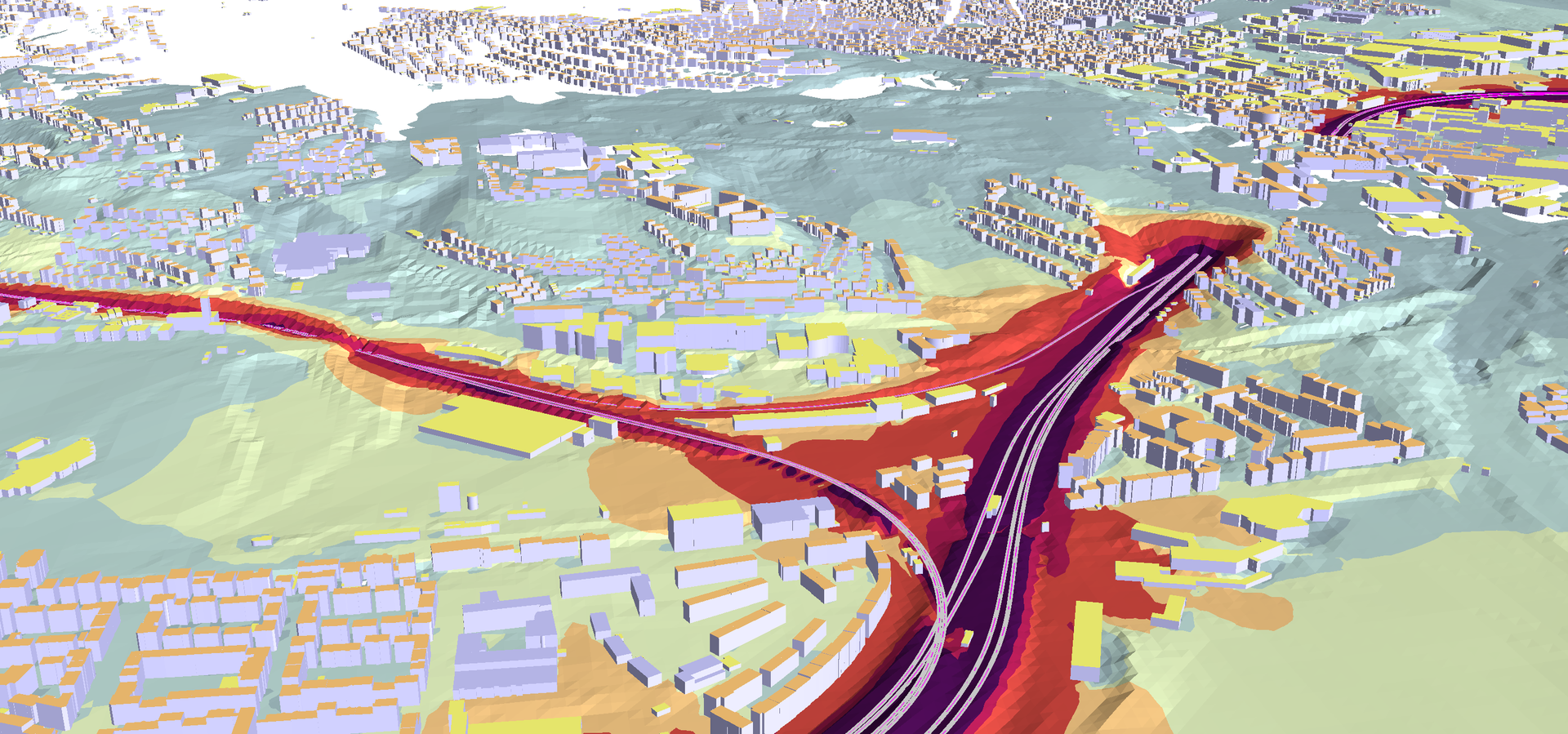
The SoundPLAN graphics are capable of joining multiple graphics elements into a single, high end graphics. To the right, you see a bitmap from an aerial photograph sandwiched with a Grid Noise Map. The content also could be a working plan stretched over the 3D landscape or a facade noise map with cross-sectional noise maps in 3D.

As SoundPLAN allows multiple geometry files and multiple noise maps to be hosted within the same project, it is very easy to select multiple files of the same content to be displayed simultaneously.

An excellent object setup allows the customization of each of the SoundPLAN objects in the top view and the 3D view.

Back to list


Spreadsheet for complex evaluation of results and areas

The Spreadsheet comes in several variants. The main one is the receiver list where you have direct access to the list of all receivers of a facade noise map, for example. The spreadsheet allows you to import other content so you can correlate and compile more complex information such as the number of people exposed to high noise levels in buildings with special noise control. You can create your own ranking, for example, by giving 10 points to noise exposure over 75 dB, 5 points for exposure between 65 and 75, and so on. Create your own assessment of the noise problem.

The area table is another great possibility where you can create feed data for the graphics so zones and  boroughs of a city can be shaded in accordance to the density of noise exposure, for example.

Back to list

Libraries

SoundPLAN is delivered with a set of system libraries. These libraries can be amended and extended at will. The libraries come in 3 categories:

  1. System library: A read only library SoundPLAN supplies
  2. Global library: A global library where all SoundPLAN users and projects have access
  3. Project library: Data inside your project

Copy functions between libraries are supplied.

The libraries include the following areas:

  • Emissions lib. for frequency dependant noise sources
  • Absorption lib. for absorptive properties of materials
  • Transmission lib. for the transmission through material
  • 2D, 3D directivity lib. as an add on to the emissions lib.
  • Day histogram for time variant industrial sources
  • Road day histograms for 24 hour traffic data
  • Wind and weather statistics for noise and air pollution models
  • Pollutants lib. for air pollution calculation
  • Assessment lib. to define Lden, Ldn, SEL...
  • Aircraft classes lib. for different categories of aircraft
  • Train setups to define the properties of different trains
  • Road Emission to set the emission properties of vehicles

Back to list

The user interface

The entire user interface in SoundPLAN is Windows compatible and every interaction is menu driven. The only place where macro language is used is the spreadsheet, where the user would expect the flexibility of writing his own formulas, etc. After the formulas are in place, you can save them as templates so the next time you want to have this complex interaction, you won't have to start from zero.

All graphics, spreadsheets and documentation tables can be saved as templates for other files in the same project or in future projects.

Back to list

Google Earth is a trademark of Google