|
Grid Noise Map and Meshed
Noise Map

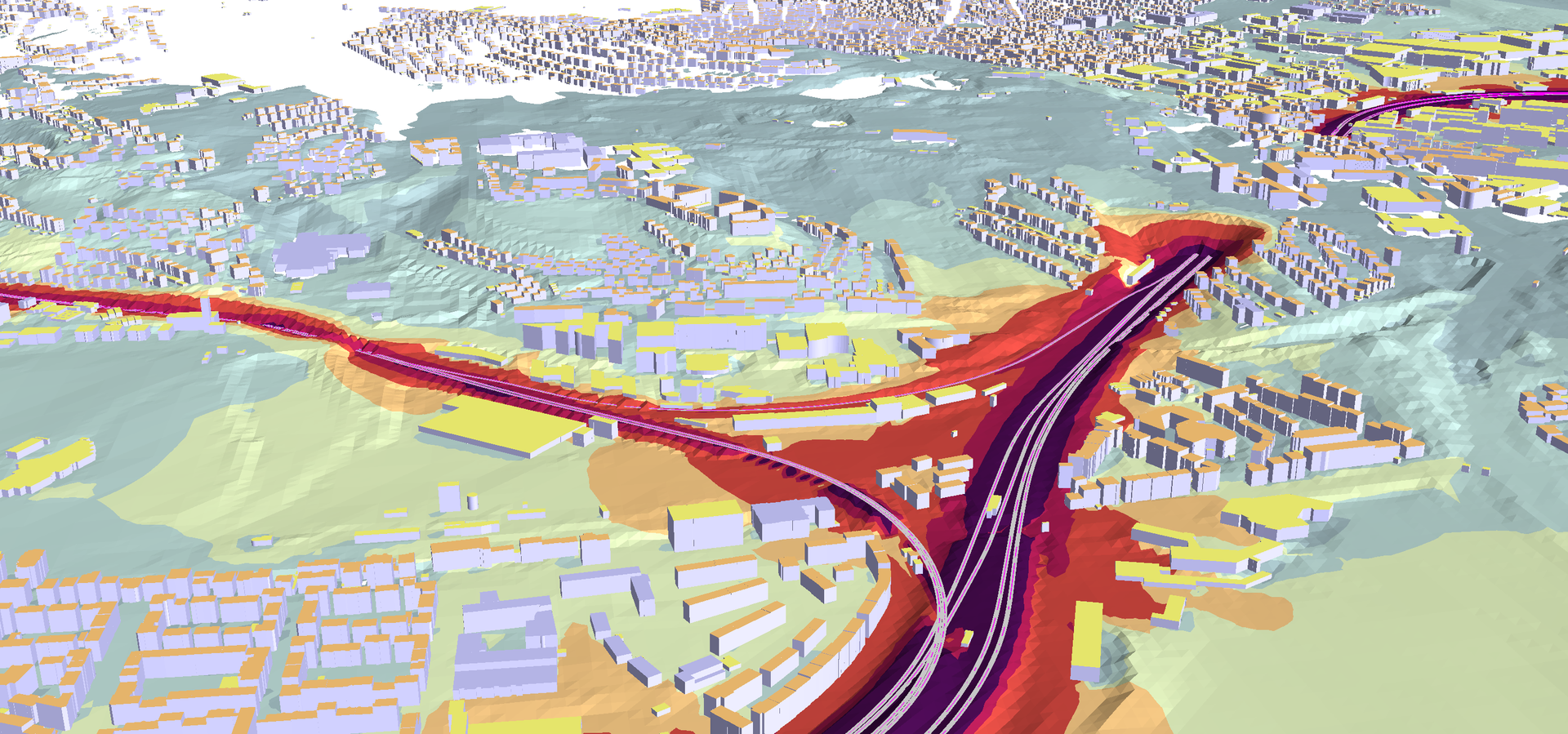
Noise Map from the END train noise map
of the German Eisenbahn-Bundesamt |
 |
Grid and
triangle based noise maps
All
noise mapping simulation software packages have facilities
to produce noise maps where receivers are arranged in a grid
pattern following the terrain in a set height. Most programs
also allow to create vertical noise maps. In addition to the
grid based noise maps, SoundPLAN offers a noise map based on
a triangulation of receivers. As receivers can be freely
arranges on the left and right side of noise barriers and
along roads and train lines, the quality of the contour
lines is superior to the grid based approach.
In the picture
to the left, the noise map is produced in a 3D solid model
which greatly enhances the ability to recognize your city.
Facade Noise Maps and Cross-sectional Noise Maps can also be
incorporated into the solid model if desired so.
The rest of this
overview will show the features of the noise maps and the
ways to format them.
|


|
Transparent triangulation to set the
height of receivers
Noise maps show the simulated
noise at a given height above the terrain, often at 2
meters. The noise maps are based on a fixed grid of
receivers with a customary spacing of either 2, 5 or 10
meters (any spacing is possible in SoundPLAN). To set the
elevation of all receivers of a Grid Noise Map, a
triangulation of all relevant objects is made (spot
elevations, elevation lines, roads, buildings...). The
triangulation is the same that is used for the elevation
supply in the calculations. These triangulations are part of
the "Situation" that is made of relevant objects.
In the Geo-Database and in the
Graphics, these triangulations can be checked in 2D and in
3D. If the triangulation doesn't represent the terrain
correctly, insert elevation lines or spot elevations
to further define the surface. The triangulation follows
certain rules, elevation lines, roads, railways and line
sources are never intersected by the triangulation to ensure these objects are always on the surface. |


|
Grid versus
Calculation Area
Grid Noise Maps have
an internal structure of a fixed grid. Multiple Grid Noise
Maps share the same origin so it is possible to combine
multiple maps to form a singe noise map. Receivers for the
maps are only calculated when the receiver falls
within the selected calculation area. These calculation
areas can be shaped at will.
The lower picture
depicts an option in the Graphics where it is possible to
highlight the calculation area and dampen the rest of the
map. |
 |
Calculations and Interpolations
Fixed grids with a 5 meter spacing
might be appropriate for noise maps in the city; for parts
of the noise map away from buildings, sources and obstacles
the required density of calculated receivers is much less
than a 5 meter spacing would deliver.
Therefore SoundPLAN employs a scheme
of interpolations within a noise map.
To the left, the
squares with green backgrounds are awaiting the calculations
and
the red squares have already been
calculated. Dark red indicates receivers are interpolated,
and
light red indicates the receiver was calculated.
As a user, you can
control the process of interpolation by defining the maximum
"spread" in dB that is permitted within a square of 9x9
receivers. You can also define how accurate the middle of a
square must be calculated and interpolated in order for the
program to interpolate the rest of the receiver points.
The picture to the
left indicates 23,134 receivers are present and that
7270 have been calculated and 4435 have been interpolated
saving roughly 1/3 of the calculation time without
compromising the accuracy of the results. For critical
calculations, it is possible to completely de-activate the
interpolations. |
 |
Distributed Grid Noise Calculations
Grid noise maps are time consuming, even for the latest
generation of processors. Especially for very big noise maps
with hundreds of road and railway sources, it is a big help
to share the calculation load among multiple computers.
For this reason SoundPLAN offers the Distributed
Computing module where only the main program needs to be licensed
and an unlimited number of calculation engines can be
harnessed into the calculations. As there is virtually no
overhead, 10 PCs will deliver the results in about 10% of
the time.
Just select the PCs
and click on the start button. It's that simple. |


|
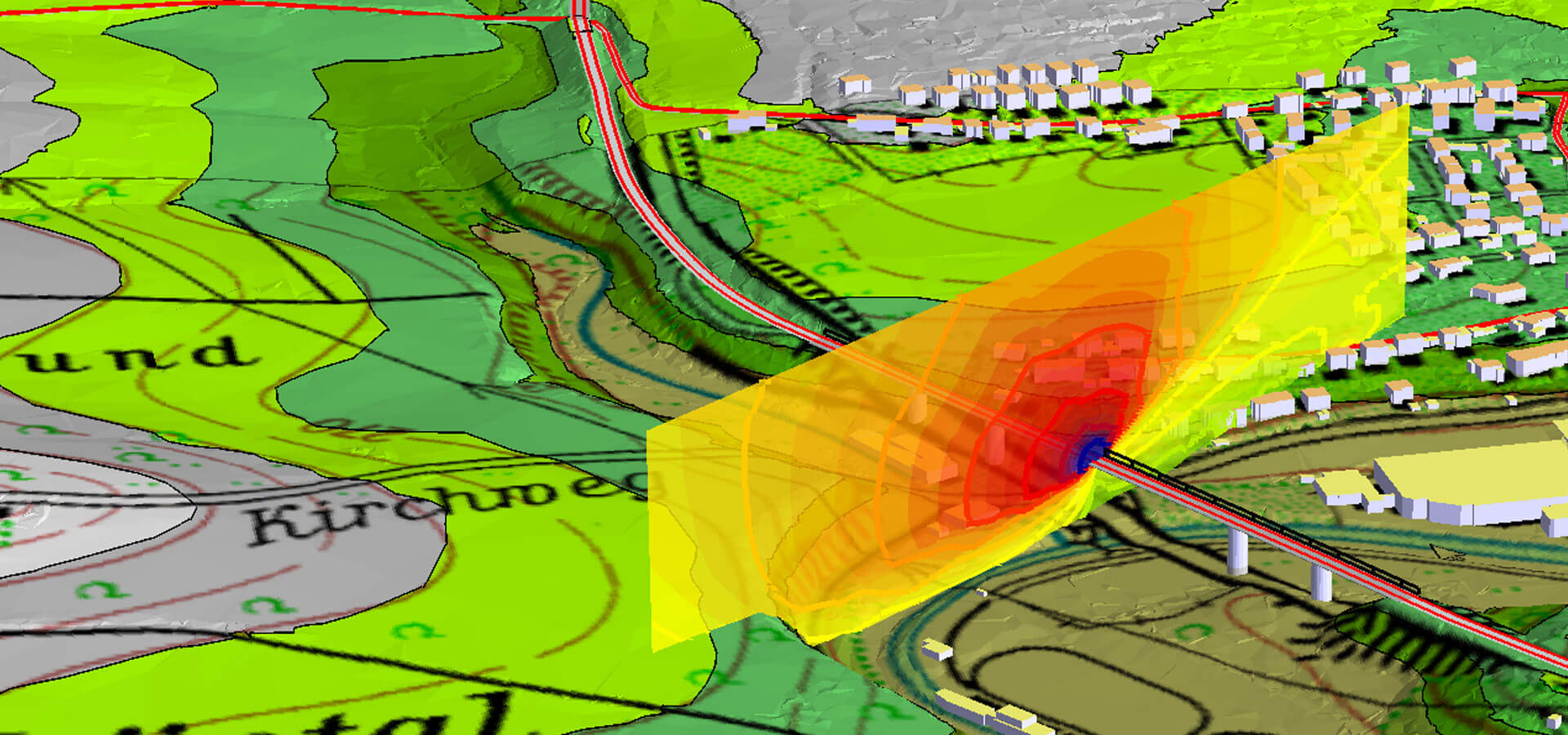
Grid Cross-Sectional Noise Map
Aside from the "normal" terrain following noise map,
SoundPLAN offers a mapping option where a vertical
noise map is calculated on top of a calculation line. SoundPLAN
calls this the Grid Cross-Sectional Noise Map.
These noise maps are perfectly suited to document the
effectiveness of a noise barrier like in the lower picture.
One or multiple Grid Cross-Sectional Noise maps can be combined with other
maps and displayed in a 3D solid model. |


|
Receivers in buildings / calculation of
substitute points / contours and buildings
In a Grid Noise Map, receivers representing a grid cell can
be located inside a building and therefore be excluded from
calculations. It is entirely possible in densely built over
areas to have all centers of all grid cells inside
buildings. This isn't much of a problem for SoundPLAN
because we calculate substitute receivers on the perimeter
of the buildings. You, the user, define how many substitute
points you want to allow and the software will then
calculate one or multiple substitute points and will average
the results. The more substitute points you calculate, the
longer the calculation time.
Other software products simply leave
empty spots for grid cells where the center of the cell is
inside the building. |
 |
Calculate
- Stop and Resume
Sometimes work gets interrupted, so
what happens when there is an interruption during the calculation of a large noise
map? With SoundPLAN, no problem! You can stop the calculation
at any given time and resume where you stopped. A
calculation that has not finished can be re-started, and if
the button "continue" was checked, calculations resume where
they were when they were interrupted.
With every
license of SoundPLAN, it is possible to calculate noise
maps while editing graphics or completing other tasks while
the noise map is prepared. Multi-tasking is built-in! |

 |
Maximize
calculation
efficiency
To maximize the
throughput of your calculation engine, multiple calculations
are placed in a table so SoundPLAN can work on calculating
one noise map after another without sitting idle until the
user can feed it more jobs.
Hosting multiple
calculations in a table also means you will have a
record of what you did. Everything is documented and
repeatable!
Calculations in
SoundPLAN are multi threaded so they will make use of PCs
with multiple CPU, and PCs with CPUs that have more than 1
core. If you have a 64 bit PC, SoundPLAN allows you to use 4
gigabyte for the program and data, which is plenty for
normal noise maps. If this is still not enough, tiling is
another option.
To maximize the throughput of the entire
system, it is possible to edit one set of data while
a noise map of other data is calculated. You do not need 2 or more
licenses of SoundPLAN to edit data and at the same time, do calculations
or produce graphics. |

 |
Re-calculate parts of the Grid Noise
Map
Nobody is perfect! If you did a big
calculation and then discovered you had a mistake
inside the elevation supply or a source that is only locally
important had a mistake in it, you can re-calculate just a part
of a noise map. You do not need to re-calculate the entire
noise map. Simply define a calculation area for the "patch"
and run the calculation in the re-calc mode to fix the
problem. No wasted time for a full re-calculation. |
 |
The object concept of noise maps
SoundPLAN is capable of calculating
and managing a virtually unlimited number of noise maps. In
the Graphics you can activate multiple Grid Noise Maps to be
displayed at the same time, and it is also possible to view
multiple noise maps in 3D along with multiple Grid
Cross-Sectional Noise Maps. Just like the Situations and
Geo-Files, these objects are the building blocks that can be
assembled into the SoundPLAN graphics. Just drag and drop! |


|
Formatting capabilities I
In SoundPLAN,
noise maps are objects and can be formatted the same way as
all other objects. Objects can have multiple sub-objects. In
the case of the Grid Noise Map, the main object has
sub-objects of the "Main interval" the "Mid interval",
"additional intervals" and the Noise Limit Line.
For each of the
sub-objects, the contour lines can be drawn or omitted, fill
can be chosen or omitted, or the entire map can be presented
in the grid pattern either in the scale intervals or as a
fluid scale. Formatting capabilities III will show details. |
 |
Formatting capabilities II
For the display
of noise maps, the color scale is of prominent importance. A
user defined progression of colors can be assigned either
use the "standard" noise modeling progression or
as one of your own making. For example, where the areas
below the noise limit are displayed in green shades, the
noise limit is left white and the areas with noise levels
exceeding the limit are shown in red tones. Be creative with
SoundPLAN! |


|
Formatting capabilities III
Different
appearances of the same noise map depend on the choices
in the object setup.
A) is the regular contour map with fills
for the main interval but no noise contour lines.
B) is a grid noise
map with a fluid scale where the value of the grid cell is
used to interpolate the colors within the color scale.
C) has no fill but
the contour lines drawn in scale color.
D) not only has the
contour lines for the main and middle of the scale interval
drawn, but also shows a contour line every dB step. As with
the present resolution, because these lines are difficult to see, a
screen capture detail was inserted in the graphics.
E) shows the grid
cells with the dB values in the middle of each cell.
These are only a
small portion of the formatting options available in the
SoundPLAN graphics. |


|
Formatting capabilities IV
Contour lines can be straight lines or exact Bezier curves
through the interpolated points of the contour lines or
curves with further smoothing of user defined tension. (No
drop-outs as seen in other software) |
 |
Inserting specific contour lines
Often it is
important to insert a specific contour line into the
graphics. SoundPLAN allows you to insert any number of
discrete contour lines and format them the way you want (color, line
width, dB value, etc.). As these sub-objects are independent
of all other objects, the noise limit contour lines can be
used in conjunction with any other formatting option. |
 |
Print Preview
Before you print
a noise map, make sure the dimensions are correct.
Check this with a print-preview. |
 |
Export capabilities
for Grid Noise Maps
Sometimes it is
desired to incorporate noise maps in different software
packages. SoundPLAN offers the options to export contour
lines or the grid values. |
 |
Grid Noise Maps in 3D
Grid Noise Maps
can be displayed in 3D either as the grid map or as a
contoured noise map. Fluid scale grid maps are not possible.
In order to display the grid map (which was calculated 2
meters above the ground) and not have it cover the road, the grid
map was artificially lowered 10 cm below the road surface. |
 |
Capability to seamlessly join multiple Grid Noise Maps
For noise maps
in agglomerations or even country wide noise maps, it is
paramount the software allows the area to be covered by
multiple noise maps. In SoundPLAN, there is no limit in the
number of noise maps. When noise are presented where
multiple map files are loaded, it is an absolute requirement
that the noise contour lines continue from one noise map to
another one without a break. In SoundPLAN this is assured. Multiple noise maps have the same resolution dependant
origin, meaning that the grid pattern continues without an
interruption from one noise map file to the next. |
 |
Noise
Maps for day/evening/night or day/night of Leq24/Lmax
SoundPLAN users
can define as many time slots as they wish. In the graphics
to the left, three time slots were calculated. For the noise map,
the level at day time was chosen. |
 |
Hot Spots
In cities, it can be difficult to
point out where noise problems are located. Roads are narrow, and it
may be difficult to see on the narrow band along the road
where the high noise levels occur. Furthermore, the normal Gris
Noise Map does not take affected population numbers into
account. The Hot Spot analysis finds how
many residents in a radius of 20 or 50 or 100 meters are
affected by high noise levels for every grid cell. The radius and the threshold
value are user defined. With one glimpse it is
possible to see in the entire city where the problem zones
are.
This is a great presentation tool! |

 |
Calculations with noise maps
Some noise
modeling jobs not only require to present the noise levels
as they will be for the planned change in the road infra
structure, but also show changes in the noise
level before and after the changes. For this, SoundPLAN
offers the possibility to do calculations with noise maps.
Use one noise map as the basis, then request the program to
subtract the values of a second noise map from it, and the
resulting noise map is the difference map between both noise
maps. As the formula is accessible, there is no limit to the
complexity of possible arithmetic operations with noise
maps.
Examples:
Calculate the
increase of noise due to a new road => use the noise map for
the new status as the base and subtract the old status from
it. The result is the increase of noise level.
Show how effective
a noise barrier is by subtracting the noise maps of before
and after. (This is the case in the graphic to the left.)
Energetically add
the noise maps of the road noise and the noise map of train
noise and the result is the total noise level. This way you
can display the road noise, the train noise and the
comprehensive noise level without any extra noise map
calculations.
Use only one noise map, but "Add a
constant" energetically to accommodate for the background
noise level of x dB.
If you check the box, "Save Grid
Operation", you can use the resulting map as the basis for
further operations. |


 |
Grid
Noise Map versus Meshed Map
With Grid Noise
Maps, all receivers are located in a rigid grid pattern.
That means receivers close to a source experience much higher
noise levels than receivers where the center of a grid cell
is farther away. There is no way to avoid that the
contouring algorithm will create unwanted "bubbles" along
the road alignment. Similar problems can be seen with noise
barriers as in the picture to the left. Some grid cell
centers are slightly to the left of the barrier and some are to
the right of the barrier. As the contouring algorithm does
not know anything about the barrier, the contours around
barriers have waves in them and bubbles.
With the Meshed
Noise Map, the receivers are not located in a strict grid
pattern, but rather where they are needed. Therefore,
receivers are on both sides of the noise barrier and along
the road and also around buildings. In the graphics, the
receivers of the Meshed Noise Map are triangulated, and the
contour lines are calculated from these triangulations.
As can be seen in
the lowest set of screenshots, the density of receivers can
be influenced, but receivers always will line the source line
and the noise barrier, assuring the quality of
contours in the Meshed Noise Map will always surpass the
quality of contours in the Grid Noise Map.
The Meshed Noise
Map is especially useful in urban areas where the streets are
very narrow. In order to get good contour lines with a Grid
Noise Map, the receiver spacing would have to be 2 or
5 meters, which would result in a very large grid file and
a high calculation time. The Meshed Map can dramatically reduce the number
of receivers needed and will
produce very good contour lines without "bubbles" and
"wobbles."
So, why not switch
completely from the Grid Noise Map to the Meshed Map?
The Meshed Noise Map functions beautifully under normal circumstances,
but has limits when Noise Map operations
are required. For the Grid Noise Map, the receivers are the
same for a map with and a map without a noise barrier. This
is not the case for
the Meshed Noise Map. The Meshed Noise Map needs to
interpolate receivers and insert them in the resulting noise
map, introducing some uncertainty. And, the Grid Noise Map
has a by far compacter file format making it more suited for very
large noise maps.
For customers who have a license for the
Grid Noise Map and the Facade Noise Map, the Meshed Noise
Map is available free of charge!
|

Detail:

Selection of frequency
ranges:
 |
Noise maps frequency by frequency
For small to medium projects, the Meshed Noise Map not only
delivers a high quality alternative to the Grid Noise Map,
but also delivers something absolutely unique to SoundPLAN.
When a noise map with industrial, frequency dependant
sources is calculated using the Meshed Noise Map, it is
possible at loading time (in the Graphics when the noise map
is selected and loaded into memory) to select which of the
frequencies or partial frequency bands the noise map shall
display.
As it is possible in SoundPLAN to have multiple noise maps
in a single graphics sheet, you can display the same noise
map multiple times, one for the low frequencies, one for 500
Hz, one for 1000 Hz and one for all higher frequencies. In
the picture to the left, the same noise map was displayed for
31 Hz, 63 Hz, 125 Hz, 250 Hz, 500 Hz, 1 kHz, 2 kHz, 4 kHz
and 8 kHz.
The middle picture is an enlargement of a section of the
picture above. The picture below shows the selection options
for the frequencies and frequency filters. |
 |
Animated
Noise Map
SoundPLAN contains a powerful animated noise map for train
noise. The calculation that results in this noise map is
the basis for finding the maximum noise level, but it can also
be presented stand alone.
Please click on the noise map to the
left to start the animated noise map, which was produced by AAC in Spain. |